Rogers 5G Home Internet




This is easily our favorite technology of the year. It does exactly what it claims, but what it claims is so indescribably cool that it takes a few minutes to believe it’s actually doing it.
Rural internet access in Canada is something of a swamp. Various levels of government have pontificated for decades about ensuring that all Canadians have affordable access to fast, reliable internet coverage. This has gone pretty much as well as most of the efforts of politicians.
Rural Canada is large, and thinly populated. Telecommunications providers really hate that.
For years, we survived with DSL internet, which availed us of a blazing five megabits down and half a megabit up on good days. It was just possible to watch steaming video if no one else in the house wanted to use the net as well.
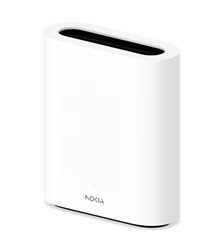
The Rogers 5G Home Internet package uses a Nokia Fastmile 5G cellular modem to connect to nearby mobile phone towers. It doesn’t care how few customers live nearby, and it doesn’t require that any wires be trenched to the home it’s installed in. If there’s a sufficient 4G or 5G cell signal in range of it, it works… flawlessly.
Boreal Data
The uncertain aspect of the Rogers 5G Home Internet package is unquestionably the availability of a sufficiently fat and stable cellular connection. In theory, if you have a smartphone on Rogers’ network, it should provide you with a pretty reasonable indication of the prospects of the Rogers internet modem.
The reality of the technology is slightly different, in part because the Nokia Fastmile modem that Rogers provides enjoys a much larger internal antenna. Ours can find a fast, stable connection even when our phones are down to a single bar.
As of this writing, Rogers will let you take their modem away and use it for a month before they start banging your credit card. If your digs prove to be too remote for it to call home reliably, you can return it and owe them nothing.
Setting up the Rogers 5G Home Internet hardware could only be improved upon if the modem included a thought-control module. Anyone with two or more functional brain cells can expect to complete it successfully. I hasten to add that the basic configuration for this device is completed by Rogers’ staff, so all the potentially complicated aspects of it were history before we acquired it.
To get on line with Rogers 5G Home Internet:
- Connect an Ethernet cable from the modem to your computer.
- Plug in the modem.
Alternately, if you favor a WiFi connection:
- Plugin the modem.
The WiFi SSID and default password are conveniently printed on the bottom of the device — where they’re impossible to lose.
We’ve operated less user-friendly sandwiches.
While your mileage will unquestionably vary depending on your location, our Rogers 5G Home Internet installation immediately availed us of about 90 megabits down and about five megabits up. We tried several speed test pages to make sure this wasn’t an optical illusion.
Steaming video is apparently throttled to three megabits per second — if this makes a difference to the quality of what we’re watching, we couldn’t spot it.
Our actual connection speed varies considerably with meteorology and how busy Rogers’ cellular network is. Warm, humid weather isn’t kind to radio signals. Tourists seem to spend most of their time doom-scrolling on their phones — this does make us wonder why they insist on driving out here. An August weekend will see our download speed drop to about 60 megabits down. This is still several light-years improved upon the best DSL connection.
We have yet to experience our Rogers 5G Home Internet connection stop working, even for a few seconds.
Once it’s on line, you can log into the Rogers internet modem through its web interface to configure it. The basic user interface is eminently approachable and easy to understand. There are additional pages available for more exacting configuration, should your use of this device go somewhere weird.
At the very least, you’ll want to change the default password and possibly the default SSID for the modem’s WiFi interface, to keep it secure.
The WiFi transceiver for the Fastmile modem is impressive. Unless you live in a 5000-square-foot mansion, it should provide a usable signal for your entire digs.
We ultimately disabled the internal WiFi for the Rogers 5G Home Internet hardware in favor of our leftover DSL modem. The latter was no better than the one in the Nokia device — but we had configured it to our liking. Should you wish to use an external WiFi router as well, it can be connected to one of the Ethernet ports of the Nokia modem.
Rogers 5G Home Internet will get along with 5G or 4G data — it will fall back to the latter if there’s a drought of 5G signal available. In some circumstances, it will use both. At least for our application of the internet, it exhibited much the same speed over either.
The Byte
Despite its stellar performance and unsurpassed convenience, Rogers 5G Home Internet is surprisingly affordable. As of this writing, the Essentials plan costs $60.00, for 200 gigabytes of data per month. The Popular plan, that we chose, costs $70.00, for 600 gigabytes per month. The Ultimate plan, at $100 per month, allows for all the data you can find a use for.
You might qualify for reduced pricing if you reside somewhere outside what Rogers considers to be its “cable footprint,” making the whole works even more cost-effective.
Rural Canadians enjoy relatively few workable options for fast, reliable internet. Prior to happening upon the Rogers device, we looked at a dedicated radio-based internet network which appeared good on paper and really, really bad in reviews of the service. The ubiquitous Starlink is seriously expensive, and requires a clear view of a great deal of sky — far more than our surrounding forest was disposed to permit it. It also entails some significant work to install its antenna.
The Rogers 5G Home Internet package is everything we could have asked of an internet solution, and more than we suspected was possible out where we live. If you reside in the sticks, you’ll want one.