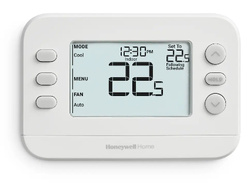
Honeywell Home X2P Programmable Thermostat Model RTHC20B





It was a sultry August afternoon, and at some length we decided to be profligate and indulgent… and no longer sweaty… and light up the central air conditioning. I walked languidly to the thermostat to summon it from its slumbers. The display panel of the thermostat was blank.
I cursed fate and mechanical rabbits – its batteries had clearly demised themselves, and at a singularly inopportune moment. Fortunately, we maintain spare batteries.
Actually, the batteries proved to be fine. The thermostat had in fact demised itself, on the hottest day of the summer. Admittedly, it was the cheap one that came with our furnace, and it had survived for just over two decades. Still, one wonders why they can’t do this in the middle of spring.
These are the circumstances that call for a prompt ride to Home Depot and new technology. We bought a Honeywell Home X2P programmable thermostat, and half an hour after returning home, the air conditioning was back on line.
While a nicely-engineered thermostat with an intuitive user interface and a big, readable display, the secret sauce of the X2P thermostat is that it can be successfully installed by anyone with a few tools and reasonable eye-hand coordination… even if its new owners know nothing about HVAC.
Wires
A programmable thermostat is effectively a clock that can be programmed to turn on either your furnace or your central air conditioning if the room it finds itself in gets colder or hotter than the limits you’ve programmed the thermostat for. For a conventional single-stage furnace, it’s just a pair of switches that close and open at appropriate times.
The tricky part about installing a new thermostat… on a hot Sunday afternoon… if you don’t do this for a living is knowing what all the wires on your old thermostat do, and how they’d like to continue doing so for your new one. Unless your original furnace and thermostat were installed by someone a great deal more considerate than our original HVAC technician, you’ll be confronted with a bundle of mysterious colored wires emerging from a rough hole in your drywall.
Fortunately, programmable thermostats from ages past had to be installed by someone too, and those ancient electricians had to know what the thermostats’ connections did. It would be preposterously optimistic to suggest that the terminal labeling on thermostats is standardized, but there’s a degree of consistency between them… mostly.
The connections have letters associated with them.
The Honeywell X2P thermostat is accompanied by an instruction booklet that includes a magic decoder page to relate the connection letters on an existing thermostat to the connection letters on the X2P. It’s remarkably comprehensive, and will almost certainly translate your existing wiring to your new thermostat.
There’s a toll-free number to call if it doesn’t.
The package also comes with a set of adhesive labels to attach to your existing wiring before you disconnect it from its former terminals, so you won’t have to try desperately to remember what the red one does after you’ve unscrewed it.
The instructions recommend taking pictures of your existing wiring as well, for an additional reference.
The X2P package also includes drywall anchors and screws to mount the device, and instructions to assist in getting it level and reasonably attractive. Its mounting plate has elongated mounting holes, allowing its position to be adjusted so it’s absolutely horizontal. Our wound up straighter than the original one that came with our house.
Having attached the mounting plate for the X2P to your wall, you can insert the ends of your existing control wires into the appropriate terminals – they have internal springs to seize your copper, obviating the need for terminal screws. The thermostat proper snaps onto the mounting plate when everything’s wired up.
It looks seriously cool.
While your mileage may vary, the X2P seems like it would entail significant effort to install incorrectly. Ours went together without incident or recourse to profanity, and worked perfectly as soon as power was restored to our HVAC.
Programming
The programming interface of the X2P thermostat is laudably uncomplicated. It allows for several changes of temperature throughout the day. All we ask of a thermostat is that it turn things on in the morning and then off again as evening draws to a close. Unlike its predecessor, the X2P didn’t require that all its temporal divisions be programmed, if some of them weren’t required.
Once it’s running, the programming of the X2P can be overridden through its front panel. You’ll probably want to do this if you leave your house unexpectedly, and want to dial back the air conditioning or heat while you’re gone. As with its initial programming, the controls to override the system are intuitive and quick to operate. The center button on the left side of the panel opens its override screen, and everything largely explains itself thereafter.
The X2P’s user interface has a number of features that may be less than obvious. As will be discussed in a moment, like its ancestor, this device is powered by replaceable batteries. Unlike its ancestor, its front panel will display an alert symbol when its batteries are approaching the ends of their days in the world, such that the first indication of their demise won’t be a complete failure of your furnace when it’s forty below outside.
One of the best tricks of the X2P is its air conditioner protection. If it senses a power fluctuation, it will switch off your central air for a few minutes, to prevent its compressor from being damaged. This one’s worth knowing about when you initially installed the X2P, as it will proclaim that it’s “waiting for equipment” when it’s initially powered up, should you be disposed to testing your air conditioner. It’s not malfunctioning when this happens – it’s just being cautious.
Our experience of the X2P has been that once it’s on line and working, it’s utterly flawless. Ours has never become confused, glitched or otherwise misbehaved.
Screwdrivers
The X2P and its cousins are available in several configurations, and furnace wiring traditionally has a number of variations. Prior to crushing your plastic for one of these devices, it’s a grand idea to disconnect your old thermostat from its wall and ascertain how it’s wired.
Programmable thermostats require electricity – there are three ways they can be powered. The X2P we bought is powered by two AA batteries. While this does entail that the batteries be changed on occasion, a battery-powered thermostat isn’t subject to power spikes and electrical hiccups. Perhaps more to the point, it doesn’t require that the wiring from your furnace include an R wire to provide it with 24 volts – not all of them do.
More elaborate… and power-hungry… thermostats require power from the furnace they’re connected to. If you’re considering the more sophisticated cousin of the X2P, to be touched on in a moment, make sure your existing wiring includes an R wire. If you’re not unreasonably dangerous with a voltmeter, make sure there’s 24 volts between your existing R and C wires.
Finally, some furnace wiring from ages past is configured to power a thermostat with 120 volts. If yours is, you’ll probably find two much thicker wires behind your old thermostat, connected to the device with wire nuts. Should this prove to be the case for your digs, you’ll need a professional HVAC technician to supply and install a new thermostat.
The X2P model RTHC20B thermostat that we bought is the simplest programmable device. It allows its programming to be configured for week-days and weekends. The slightly more expensive model RTHC21B has more flexible programming options – you can configure its programming separately for each day of the week if you’re up for it.
Finally, the model RTHC2CWF – at about twice the price of the one we bought – has an internal WiFi interface to allow it to be controlled by a smartphone app, and by Amazon Alexa, Google Assistant and Apple Home. It will remind you to change your furnace air filters, and operate additional devices, such as a heat pump and a water heater. This one does require a 24-volt power supply from your furnace… and a much more complicated lifestyle than ours.
Finally, be aware of the Honeywell X1N thermostat, which looks superficially like the X2P and usually costs slightly less. This is a non-programmable thermostat, and unless you really want to become one with your furnace, it’s arguably not the device you should choose.
Our furnace and air conditioner are both single-stage devices – they’re either running or sleeping. Some furnaces have two stages – they start slowly and then increase the heat they generate and the blower velocity they use to move it if they think it’s prudent to do so. The X2P appears to be intended exclusively for single-stage HVAC systems. Should you have a two-stage furnace, you’ll probably want to summon a professional technician to replace your thermostat.
Warmth
While the flawless performance of the Honeywell X2P has subsequently endeared it to us, its ready availability, non-frightening price and effortless installation were happy surprises on a day when we really needed something to go right. The level of thought that’s gone into it to make it easy to wire up and get working are impressive.
Furnaces are sufficiently daunting without funky electronics to dial up some ominous background music.