Rogers W35 Rocket Mobile Hub








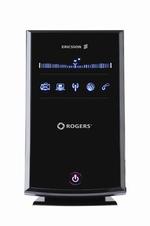
This review arguably won’t be of much interest should you happen to reside outside Canada – Canada being Mr. Rogers’ neighborhood. For the passing interest of those fortunate enough to enjoy a more robust national telecommunications industry, Rogers is one of the three primary telecommunications companies in Canada.
Can you say “oligarchy?” I knew you could.
It’s a source of pride and gratification to the people who write speeches for Canadian politicians that the populace of Canada is among the world’s most connected. Something like 85 percent of Canadians access the Internet. This statistic is a bit misleading, however, in that a fair number of them still access it though dial-up modems, just as their forefathers did in the preceding century.
Canada’s telecommunications companies have done a masterful job at keeping the price of Internet access high. In addition, should you happen to reside in rural Canada, as do we, they’ve made conventional terrestrial Internet access something comparable to science fiction. There’s not a lot of money to be made wiring up the widely-scattered homes outside cities, and for the most part, they don’t.
For many rural Canadians, the only form of Internet access quicker than a dial-up modem is a satellite uplink, with which we have accessed the net for years. While it sounds cool, satellite is somewhat more expensive than conventional DSL, and not all that quick. A modest downpour will slow it down further or silence it altogether, as will snow and the geometry of the sun relative to the satellite in question several times during the year.
The Rogers Rocket Mobile Hub purports to be Internet access for those of us unlikely to see DSL in our lifetimes. Powered by Rogers’ cell phone network, it claims up to 7.2 megabits per second download connectivity if it can access a 3G+ connection.
Needless to say, we bought the first one in town. We were thoroughly shocked when it worked.
In fact, the Rogers Rocket Mobile Hub worked very well once we’d overcome a few setup issues. Those setup issues, however, weren’t to be trifled with.
Outside the Box
The Rocket Mobile Hub is essentially a cell phone modem and a wireless router in a single box. You can connect it to up to four systems through RJ45 Ethernet cables, and it’s said to support up to ten computers through its WiFi interface. It’s a product of Ericsson, which has been responsible for all sorts of state-of-the-art broadband technology.
To its credit, the Rocket Mobile Hub represents the easiest Internet connection yet devised by human hands. Plug in the hub, plug in an Ethernet cable and it’s good to go.
At least, it’s good to go if it can find a signal. While Rogers’ coverage map suggested that our area had enough signal strength to microwave a medium-size chicken, the Rocket Mobile Hub concluded otherwise. Perched upon a shelf, it deigned only to connect to Rogers’ conventional GSM voice network. While we’d hitherto been unable to imagine a broadband connection slower than that provided by our satellite link, the Mobile Hub found one.
After some experimentation, we discovered that balancing the Rocket Mobile Hub on a window sill allowed it to just barely connect to Rogers’ 3G+ network – with zero bars of signal. The connection proved stable, and while it didn’t allow for anything like 7.2 megabits of bandwidth – 1.7 megabits download was about average – it was pretty quick.
It had the drawback of requiring that a fragile four-hundred-dollar modem reside somewhere certain to see its eventual demise.
The documentation for the Rocket Mobile Hub suggested that the issue of low signal strength might be rectified by attaching an optional external antenna to the hub, a connector for which is located in the side of its case. This observation initiated the first of several protracted and highly frustrating attempts to obtain customer support for this device.
- As the Rocket Mobile Hub’s documentation suggested, we began by calling our local Rogers dealer, from whence had sprung the hub itself. The staff member who answered the phone knew nothing about the external antenna, save that they didn’t sell one.
- We continued the quest by calling Rogers’ phone support, working through a considerable depth of voice menus, and listening to a lot of advertising-on-hold for iPhones. Our first live human being turned out to be the wrong live human being. After listening to a lot more advertising-on-hold for iPhones, we got through to the right live human being. He agreed that we needed an antenna, but he couldn’t suggest what sort of antenna would be useful. He recommended that we contact Sony Ericsson, whom he maintained had made the hub. He thanked us for choosing Rogers. The call lasted 24 minutes and 38 seconds.
- Sony Ericsson’s web page didn’t list the W35 mobile hub, or anything like it. We tried e-mailing them. They didn’t reply for some while.
- We returned to Rogers’ web page and tried for some e-mail based support. After a day’s wait, Rogers replied with an automatic message apologizing for whatever it was we were having problems with, and noting that we’d previously contacted one of their phone representative. They concluded that this having been the case, our problem… whatever it was… must have been resolved.
- When we replied that it wasn’t, they suggested we try contacting Sony Ericsson.
- After several days, Sony Ericsson got back to us, saying “we don’t sell mentioned external antenna. I recommend you to look for it on 3rd party websites.” They didn’t mention which “3rd party websites” to look for it at, or what exactly we were looking for. They thereafter cited “Sony Ericsson’s commitment to excellent customer service.”
- Thinking outside the box, we decided to try Sony Ericsson’s chat support. While it lacked advertising-on-hold for iPhones – for which we were singularly grateful – it took about ten minutes to get through to a live human being. Some typing later, we were told “You have contacted Sony Ericsson, we do not support Ericsson products. You will need to contact them directly for further options.” They gave us a phone number for Ericsson.
- The operator at Ericsson maintained that Ericsson has neither a customer service nor a technical support department, and as such, she couldn’t assist us.
- We decided to try the slightly larger Rogers store in the next village. They gave us a phone number for something called “Nerds on Site,” whom they’d been told had been hired by Rogers to deal with the shrouded mysteries of external antennas. They didn’t actually say “shrouded mysteries,” of course.
- We called Nerds on Site, who took our phone number and said they’d get back to us “within the hour.” They didn’t, and when we tried to call them later in the day, we got voice mail – lots of voice mail. It took over a day to get back to a live nerd, who promised to “forward our message to the nerd in our area.” Our nerd got back to us several days later. He was calling from somewhere very noisy, probably using a cell phone, and it was difficult to understand what he was saying. He explained that an antenna would cost us about $250, and entail some drilling and general premises modifications. He expected to have some in a few weeks. He promised he’d phone us as soon as external antennas were available. We never heard from him again.
- Some Googling eventually turned up a company called Powertec, which sells Ericsson hubs and lots of compatible antennas in Australia. We ordered a Laser 710 antenna from them, on the advice of their staff, who described it as being suitable for indoor installation. It produced less signal than the hub with just its internal antenna. Upon contacting Powertec, they told us that the antenna needed to be five meters higher than the hub to work. Not having fifteen foot ceilings, this proved to be a bit awkward. They agreed to let us return the antenna.
- About two months after our initial call, someone from Nerds on Site got back to us, offering us an outdoor antenna for $225, plus $25 shipping, plus $175 for installation, plus tax. Upon consideration, 1.7 megabits download doesn’t seem that bad.
Other minor concerns with the Rocket Mobile Hub began to pop up. Its network connection got up and blew away several times a day, even though its front panel display showed that it had retained a grip on its 3G+ connection. Powering down the hub and restarting it resolved this. An equally convoluted support session with Rogers arose in the wake of this problem, involving several levels of technicians promising to call us back to address it. A lot of e-mail traversed cyberspace over it, featuring numerous repetitions of the phrase “we strive to provide you with the highest level of customer support.”
After almost a month of wrangling with Rogers’ technical support, we were given a ticket to authorize that our original hub be exchanged for a new one. This reduced the number of crashes to a manageable level, although the issue remains essentially unresolved.
The mobile hub allowed access to pretty much every web page on Earth, with the somewhat mysterious exception of www.rogers.com, which it blocked. Addressing this through Rogers’ customer service channels has thus far proven unproductive. Rogers’ home page – and hence things like on-line data usage monitoring and bill management for the Rocket Mobile Hub – remain inaccessible as of this writing.
Rocket Science
We were pleased to note, in our ongoing evaluation of the Rocket Mobile Hub, that weather conditions seemed not to perturb it greatly. It remained connected to the net during a storm that reduced our satellite connection to dust for over an hour. On the other hand, the documentation for the hub enjoins its users from exposing it to direct sunlight, something of a paradox when it only functions if it has a window to look though. We experimented with some black craft paper and sticky tape.
The WiFi interface of the Rocket Mobile Hub deserves attention immediately after you get the hub plugged in and working. Most mobile routers boot up with limited accessibility and as such, a modest level of protection against cyber-cretins accessing them without permission through their wireless interfaces. This one does not. The hub can be configured through its WiFi interface – rather than insisting on a wired connection for administrative access. Its default WiFi password is four characters long and easy to guess. A nearby user could readily hack into your Rocket Mobile Hub and use the expensive bandwidth it provides until you noticed the astronomical nature of your bill and locked down the router.
We presume that the Rocket Mobile Hub was configured this way to make it really easy to access, even for customers who can’t successfully program the clock on a microwave oven. It might be a bit too easy for its own good… or at least, for yours. As soon as the shrink wrap from the packaging stops crackling, log into the router and change its access password to something a lot stronger.
The WiFi performance of the Rocket Mobile Hub proved to be somewhat restricted. While the Belkin WiFi router that we’d used with our satellite network could hurl a solid WiFi connection beyond the walls of the building and about 200 feet down our driveway, the Rocket Mobile Hub’s WiFi was gone in the next room, 50 feet away.
Well it may be argued that this constitutes a degree of protection from the aforementioned hackers. Hackers can’t hack what they can’t find. If you were thinking about using the WiFi functionality of the Rocket Mobile Hub to bounce the Internet all over your house, think about an external range booster.
We resolved this issue in house by plugging the now-orphaned Belkin router, with its exceptional WiFi, into the Rocket Mobile Hub. This seemed like the sort of thing that shouldn’t work, but surprisingly, it did.
The Rogers Rocket Mobile Hub, while slightly less expensive than a satellite connection, isn’t cheap. In the defense of our satellite company and their suppliers, they had to launch a five-ton Astrium satellite 22,500 miles into space to power their network – Rogers just sent some guys out in trucks to plug in a few repeaters.
The hub itself costs about $150 with a two-year contract, or $400 to buy the beast outright. Make that $170 with taxes. Add $35 for an account setup fee – and some taxes on that – and the buy-in cost is well over $200 before it’s surfed a single page. $35 a month – plus a “government regulatory recovery fee” of $2.46, plus about five dollars in taxes – will allow it to deal with up to three gigabytes of data. The data cost escalates to $45 for five gigabytes, and to $60 for ten gigabytes. Add appropriate taxes. Cue credit card.
Three gigabytes looks like it will manage a reasonable month worth of e-mail and web surfing – this is arguably not the Internet access device to consider if you anticipate streaming video, playing interactive games, using an Internet telephone or downloading music or movies.
As an aside, Rogers will allow you to replace your home telephone with a Rocket Mobile Hub. The up-charge for this makes it cheaper than a conventional terrestrial phone line if you’ll be using the hub for Internet access as well. We didn’t try this option.
In the further defense of our satellite company, when we called them to bid them farewell and terminate the satellite Internet link, they offered to leave our account “suspended” at no cost, such that it could be reactivated with a phone call if our new broadband solution began to misbehave in the future. By comparison, the contract for the Rocket Mobile Hub includes early cancellation penalties running into hundreds of dollars.
Rogers will let you pay for the hub, try it and return it within fifteen days if it doesn’t seem to be working out for you. In the event that you choose to send it back to from whence it came, be really, really certain that the store employee who accepts it processes the return and cancels the automatic billing to your credit card while you wait. Get something in writing to this effect. Several months prior to our sojourn with the Rocket Mobile Hub, we tried and returned the earlier Rogers Rocket Mobile Stick under similar conditions. Having failed to observe the foregoing precautions upon its return, Rogers began billing us for the non-existent account. It took just under four hours of listening to advertising-on-hold for iPhones over several days to resolve that one.
The Rogers Rocket Mobile Hub is a workable bit of technology, despite its logistical concerns, and one of the few realistic alternatives for Canadian rural Internet. Confronted with no more efficacious providers of high-speed broadband out here, we ultimately decided to keep ours. Our experience of its parent company was less than salutary – we’d have cheerfully dealt with just about anyone else, save that our experiences of its competitors were no more appealing.
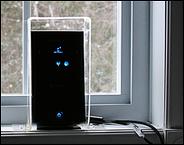
Afterword: With the promise of an external antenna unresolved and apparently unresolvable absent serious building modifications, we ultimately settled for leaving the hub on the most advantageous window sill. Some Plexiglas salvaged from a cracked desk cover and an hour of experimentation with a blowtorch resulted in the amazing Rocket Hub House™ illustrated here. Should it not be obvious from the photograph, the plastic cover is screwed to the window sill.
The hub is now reasonably safe from flying debris and plummeting venetian blinds.
The hub appears to have stabilized considerably over its first few months. It no longer shuts down several times a day, which suggests that its earlier vicissitudes were actually network issues, rather than problems with the hub itself.
One such network issue silenced the hub for several days, requiring that we resort to satellite broadband. True to their word, Xplornet had us back on line through outer space in less time than it took to phone them, and the phone call involved no time on hold.
After-afterword: After scoping out a number of potential external antennas for the Rocket Mobile Hub, we sprung for an R.F. Connections window mount antenna, the details of which can be found in a separate posting. While this device arguably won’t be sufficient to pull seriously remote hubs out of the noise, it was all ours needed to light up its bars.
I wish I had read this early today.
I just spent the day playing with a Rocket hub for the in-laws. If you can get a good signal this thing is slick and I think a great value.
This all started a few days ago when we I found out that I could get 1 bar of 3G on my iphone at their place in an upstairs window. They are in Val-Des-Monts Quebec (in hills) and only can get 19.2 via dialup. We struggled on buying it outright vs. on contract. Bought it outright because we were told that there was a $400 cancelation fee for the voice and possibly an additional $100 cancelation fee for data. (Retarded!) Rogers Plus lady was nice but really didn’t know much about this thing said we had 15 days to return it if it didn’t work.
We bought the rocket hub and decided to set it up at my place first where I get great 3G coverage.
Funny thing was we couldn’t get a signal with it and after logging in to the hubs web page we could see it actually was on the network but gave us an access denied msg on the mobile network page. Called Rogers and was juggled around with the off shore support were we finely got someone who said there was a problem with the network that was making the hub not show the signal strength but that it should still give us internet. I was sceptical but he was right and we got 2.03Mbps down and 1.93 Mbps up.
So we packet it up and took it to in-laws. Put it up in the window beside the iphone but was disappointed when the rocket hub only gave us 1 bar of 2G. It could barely load Google page. Iphone was able to surf data and make phone calls. Not one to give up I convinced the father in-law to get a broom stick to stick the hub out the window. Got 2 bars but still only 2G. We could surf but still really slow. Asked him to find a longer pole. He came back with a 12 footer. Lot’s of tape later and some frost bite we got a 3G signal and 1 MB down. We did a quick Skype video conference with the sister in-law in Texas. Success!
We knew this thing could work but we would need an external antenna on a pole. “May need an external antenna” and “contact Rogers for external antenna” is plastered all over the box and in the documentation. 40 min later, 2 phone calls and 6 people later we finally get someone who tells us that Rogers doesn’t sell it and that Nerd’s is contracted out to sell and install it. We get transferred to Nerds and we get our info taken down to have a call back to gives us an idea of cost of the install.
I’m expecting that Nerds isn’t going to be the right people to climb 60+ feet to install an antenna on a mast. Rogers needs to train their people on this and really sell the kit direct to those who want to install it. Currently sourcing my own external antennae kit should the Nerds not pan out or be a boat load of cash.
Conclusions so far.
Over all a very cool little hardware product.
Voice/Data plan is great value.
Antenna in this thing sucks or an iphone has a magical antenna/receiver in it.
Rogers people haven’t been trained on this product yet.
I’m in the same boat as your in laws, I live in the township of Flamborough Ontario and also can only get dial up. I finally got this product after 1.5 months of calls and was so excited to see how it worked.
I opted for the data plan only and am willing to pay 60 + a month if it works properly.
After getting it all setup I also called the tech support because I had no signal bars. I got the same explanation.
Download speed, .68 mbs Upload speed .02 mbp
I’ve placed the Hub in the highest window in my house.
Again, same thing as you said. Rogers told me to call the geeksquad and they had no idea what the rocket hub was.
After doing some googleing I came up with a site in Aus that makes the w35 antennas.
I’m still trying to find a decent solution and only have a few more days to do so as my 15 day trial period is half over.
I would like the Hub to be fast enough to play online video games, but that’s not looking so good.
I’m very impressed with the person’s writing ability and humour who wrote the impressive story of his exploits with the Rocket Hub in Muskoka. If he doesn’t write for a living, he should think about it!
I acquired a Rocket Hub on Dec. 11/09 to replace the horrible Rogers “Portable Internet” modem which regularly was slower than our old dial-up connection. We live in Caledon (north of Brampton) and have a great 3G+ signal here and according to speedtest.net we are getting 3 GB up and down most of the time with the Rocket Hub so for us that is really great.
The only problem we have had and still have is occasional “disconnects” that requires either the Hub to be re-initialized (unplugging or switching it to standby briefly) or as we finally discovered disabling and re-enabling the wireless adapter in our two computers (one a PCI adapter and the other a USB adapter). After multiple calls to Rogers tech support they finally agreed today to send a replacement after I asked for them to transfer me to a more senior person if they didn’t agree to do so. Hopefully the replacement will solve the problem.
I did try using an ethernet connection between one computer and the Hub and that worked flawlessly during the 6-day trial but that is not how we want to use it.
We know our wireless adapters work okay because that is what we used when we had our Linksys router tied into the Rogers “Portable Internet” modem.
I did try to connect the Rocket Hub to the Linksys router via an ethernet connection but for some reason that didn’t work at all.
I agree that the Rocket Hub is a great concept and great product.
The data plan is very good value (far better than than any USB modem plan I looked at)
The up/down speeds are excellent and works well for Skype video calls.
However, accessing and dealing with tech support is not an engaging or pleasant experience.
Great Article. I live east of Parry Sound and we only have a dial-up connection with Vianet. Now that our daughter is a bit older she is on the net often and dial-up was killing us. We opted to get the Rogers Rocket Hub in place of the dial-up with both the Data/Voice Package.
We were also promised the availability of an external antenna, so we brought this little gadget home (Bracebridge was the only dealer that we could find that had one). Plugged it in and voila, instant high speed internet!!!!! I excitedly plugged my telephone into it (I am happy to get away from Bell), and the connection was terrible. I noticed that we only had one section of bars lit up. The next day we had two sections of bars lit up, I plugged the phone in and it was excellent……..the next day we still had the 3G but no bars…..data still worked but the voice didn’t. Good thing I didn’t jump the gun and cancel my bell service.
Back to my original purpose for this little story. I went through similar bumps searching for an antenna. I talked to the Rogers dealer in Bracebridge and was told that the Nerd guys could install an external antenna on my house for the low cost of $450…..WOW……so I called the Rogers help folks and was told that they did not have an external antenna available. I went as far as to go to Toronto to a Rogers dealer to ask about the hub and an external antenna and the guy looked at me like I had a third eye directly placed in the middle of my forehead. He did however look into his computer and it showed a part number and price for the external antenna $99.99.
When I got home from my trip to the big smoke, I called Rogers again and after a grueling hour and a bit on the phone, I got to talk to a real live person. They told me that there was definitely not an external antenna for the hub. I again said that they advertised one on their website and if they did not in fact have one, they should remove it from the site. WOW, the next day it was gone off the Rogers website.
This all being said, I work in a location with some radio technicians and have managed to buy all the parts I need for an external antenna for about $150. Here is what I purchased:
Adapter cable from Powertech
20 feet of LMR 400 Cable with adapters
Multi-band directional Yagi antenna
This all seemed to work. But before trying this, I went into the attic, stuck the hub in one of our gable vents and turned it upside down so the signal would be “shot” through the house. This worked but not as good as the antenna.
Anyhow, just wanted to add my two cents. The hub works great when it works and I do recommend it to people.
Interesting posts. Great to hear that despite the painful support and antenna experiences the product has been well received. I work for Ericsson.
Note that the product is built by Ericsson not Sony Ericsson so if you contact Sony Ericsson they will know nothing about the product.
A few comments and items of interest although it seems most of you have solved your issues.
External Antennas: There are several antenna options that will be available in Canada in the coming days as approved accessories for the Rocket Hub. Unfortunately you early adopters are the most likely candidates for external antennas.
– In the interim “Nerds Onsite” is an option: 1-877-897-0957. Inquire only about an antenna that supports the specs in the DIY option described next. They may not know the Rocket Hub, but they know antennas.
– “Do it yourself” options can be purchased from Wilson Electronics, or other websites at a lower price than buying all the way from Australia. The key to have is that the antenna much support 850/1900 Mhz and the adapter is an “MCX” male (female on the hub). The antenna choice depends entirely on what you want. Self installs are possible, but professional installs from the likes of Nerds Onsite is recommended if you are talking about mounting extended masts above tree lines, etc.
Helpdesk: The best number to call at Rogers for support on the Rocket Hub is 1-888-Rogers1 (note that not all the responding support staff have gone through the training yet being so new hence your experience) I recommend you ask for someone who is trained to support the Rocket Hub. Additional support can be found at the hub forum from Rogers.
Positioning the Rocket Hub: Best performance of the built in antennas is with the unit being vertical (on stand, or wall mounted) Don’t recommend pointing downward through the grid.
Wifi: It is possible that your device does not have the maximum power setting on the WiFi (50 feet seems odd and not normal unless your home is made of metal or thick concrete. Check wifi power setting on the WLAN page of the web interface. Repeaters are an option, or other Wifi routers but the other router needs to be in hub/switch modem or you will get IP address conflicts. I have also seen cases where users want to get the internet access outside into a barn/shop but the wifi isn’t strong enough, and running an extended cable isn’t feasible. In that case, I suggest a new device (Belkin offers one) that delivers Internet over your home power wiring. Essentially, the Belkin solution has 2 connectors. 1st plugs into the Rocket hub via Ethernet, then plug into wall outlet (cannot be a power strip), 2nd belkin plugs into wall outlet where you are trying to get the internet (again, don’t plug into a power strip/surge protector) and then plug an ethernet cable into the port and your PC. Easy way to do inside wiring without pulling cables.
“Disconnects” The rocket hub is designed to be “always on” as long as the network signal is strong enough, and available. Reading the examples shared, it is most likely network issues in the area since most of you are not getting strong signals (which are mostly resolved with the external antennas). Although it sounds like each of you are tech savy, if you are moving to the Rocket Hub from a Dial Up connection there are some things you may want to check on your PC/Laptop. A) DHCP lease time or auto renew (some older PC’s that haven’t been connected via an ethernet cable, or Wifi need the network connection settings checked. When you have to power off your PC/laptop to get connected again it is usually in the DHCP/IP address settings. Basically what is happening is the PC “forgets” that it is connected or should stay connected to the hub. B) We have also found issues with Microsoft Vista when using Wifi (won’t stay permanently connected)- where an upgrade to Service pack 3 is needed to fix the vista bug.
Excellent posts and great to hear that more Antenna options will be made available in Canada soon? Would have thought that an “approved” antenna option would be available at a Rogers store or at least more information rather then dealing with Nerds on Site or a different outfit. I am in the same boat with a pretty good signal where I can get about 2mb down however would love to have that improved. I wouldn’t want to go down the path of purchasing an external antenna only to find that the signal improvement was minor in comparison to the cost.
Having a location we can call with the detailed part number, option to self install and ability to return if no significant advantage gained would be the ideal solution.
Also would like to point out that with Rogers you do not get a public IP address assigned to the Rocket Hub. This is important for those users (such as myself) that have a remote internet camera. The ability to port forward is an option on the HUB however since Rogers does not give you a public address it will not work. You do have the option (extra $10 a month) to purchase one from Rogers I don’t want to go down that route (doesnt seem right) so I have resorted to configuring my camera to send a scheduled upload of pics to a Public FTP site. Rogers should revisit this policy as there are many like me that will use the Hub in their Cottage or remote location and therefore use it for security or monitoring (temp etc…)
Thanks and here’s hoping we do here more in the coming days and weeks. I’m just passed the 15 day window and will keep it with the assumption that the Antenna and these other things will work themselves out.
Great info on the Hub. I Purchased a hub 2 weeks ago. We live out in the country and are getting 3 bars for signal WOW!!! Average 4.2 Mps down and 1.2 up. Running a PS3, 3 laptops and 1 wired. It was very easy to hookup and is always up. The PS3 connected right off the get go. The hub is alot more stable then the Rocket stick.
HI. Loved all your comments. I have had the hub for a month and a half. It hangs from a blind in my wife and my room for now. The hub is plugged into a D Link router which is attached to one of the Ethernet connections in the hub and the Ethernet cable runs down to the basement through a heating vent to the router. It is the only way we have right now to get a steady signal. I have, on order, a 50 foot length of LMR-400 Times Microwave antenna cable. I have an antenna for 1900 MHz cell signal. I paid $13.99 for a pigtail to attach to the Hub at the connection on the hub for an external antenna. I got it from Australia. It takes a MCX male connector (the hub has a female) and they are not available anywhere in North America, that I could find. The shipping for the pigtail was $ 40.00 so I also ordered the battery backup for future in case I go to home phone as well. This did not increase the cost of shipping and I received two products. With the antenna in place and connected to the hub with regular coax that you would use for you sat. TV I had four bars on the hub for connection strength. I have since found that proper cable is needed or you can actually lose more db than you have attained from the antenna as it goes through inferior cable. I am waiting, with baited breath, as are my 16 and 13 year olds to see if we can finally move the router to a permanent location out of the way and not hanging from our bedroom window and get some serious connection strengths.
While in the window it gets four to eight bars at times. The best download I have had is 4 Mbits but it still has stability issues. I am now beginning to believe that this is not our hardware but Rogers infrastructure or hardware as it is a relatively new technology.
Believe me, my teens demand solid technology which resulted in me paying half price for Bell WiMax for two years after I complained and complained. The hub is by far better than the Wimax system, which could drop to less than dial up conditions due to soooooo many people on the towers and server congestion.
Internet suppliers to the rural community are like bringing water to dessert people. The people will, however, get furious if they are given the water in leaky cups…….
I… would like to change the root and operator account passwords accessable via Telnet for security purposes and so I can configure a IPSEC VPN connection.
Have just installed the Hub, welcome to the new milennia. I can take my sign on the road, “warning entering digitally handicaped area drop speed to 28.8 !”
Download speeds 3.98down and 1.99 up with two bars of signal strength.
VPN doesn’t appear to work, additional charge? Dreading calling Rogers support the web support passed me to the 1-800 number because they are not trained on the device.
Has done a few funny things and at this point doesn’t like my Microsoft Media Server, (don’t do this at home kids).
Hi,
Interesting article, I recently purchased the data only option from Rogers, I too have this perched on a window sill and am looking for an external antenna solution, talking to nerds on site, they are willing to sell me the adapter and cable (MCX to N to FME) for about $70.00 then I can just plug in a car cell antenna. (Seriously thinking of a Wilson cell phone booster, as I can’t get reception in the house at all, but very pricey).
After 4 days with the device , its a great solution but have had flakey wireless problems with it. Have had to reboot it a few times to get the house wireeless back up. It just disappears completely without any errors logged.
Rogers support was fine after 45 minutes of hold time. If it happens again they will swap it. Not sure why I need to wait for another incident but thats the way it is.
Concerned that I should not have purchased it since they are in the process of upgrading the network to LTE ( I think thats what the next generation is called). Apparently connectivity is up to 27 M with that version, wouldn’t that be nice. This device in HSPA mode will max out at 7 mb. Wonder what their plan will be to upgrade the fleet without alienating people like me?
They verified that there is a $10 /month charge for VPN. Don’t see this documented any where.
The support guys don’t know what the root and operator passwords are. “its locked”. Bit of a security hole in my opinon, the last people I want coming into my device is Rogers.
Finally they could not verify if I purchased a antenna I would get higher speeds , which right now are around 4M down /2M up, with 2 bars from the graphic GUI. If Rogers sold the antenna I could buy it and then return it if it didn’t so anything.
It would also be helpful for my situation if they told me where the tower is locacted so I can optimize the location of the antenna on the house sue to large overhangs and metal roof.
All in all a great solution for the last mile of connectivity that has been so long getting here. I can now cancel my extra Bell phone line and throw away the modems..
John
This has got to be the best review i have read out of all and i went ahead with the purchase of the W35. I picked up an antenna from one of the google sponsor sites but what a waste of money and time. I then picked up an antenna from broadbandcanada.com and to my delight it really showed great results. Easy to install, comes with all the equipment needed to make work and great customer service. Since this antenna is dual band, it helps a lot in future since Rogers is pushing their 1900MHz frequency to reach more population in addition to their 850Mhz spectrum. Best of luck guys and hope it works as great as it works for me.
Purchased the Hub April 06 to replace Novatel U727 USB stick. The Stick worked reasonably well during travels across Canada, but did not work well at a local location (neither did Bell cell phones) and the Bell Data Plan, similar to Rogers got progressively expensive as usage increased. Could have gotten Cable or DSL – but neither is mobile.
The Hub connected immediately out of the box and with a Rogers tower nearby shows full signal strength. Download speed is usually between 4M – 6MB and upload approx 1.5MB, actually faster than Bell DSL at home. Drove around for awhile with the Hub plugged into a 300A MSW Power Inverter and always had a strong signal. Purpose was to test for laptop connectivity while mobile – worked flawlessly. Have not yet tested cross Canada connectivity while on the road.
Might have seriously considered a 3G Bell / Rogers Stick or MIFI if the Hub data plan had been available, however $35 for 3GB sure beats $65 – $70 for the same GB on a Stick plan. Also relatively short time before recharge ruled out the MIFI options. Option for local / long distance phone was also a factor in favor of the Hub, especially when we travel. If I understand correctly we could make unlimited “local calls” while on the road for $15 / mo, as compared to $0.25 per minute for the Cell phone.
Based on one month service has been fast and flawless.
I have finally gotten around to installing an antenna to the the hub.
First installation was The omni-directional antenna Laser 710 .
The results where quite good, signal went from 2 bars to 4, till the tress filled in.
Now using a Yagi Antenna with a 9 dbi gain and maintaining 3 bar signal. Lining up the antenna was easy.Cost $123
Your review had me giggling all the way through it. I do enjoy a well written article and yours was just that. Your witt is amazing with comments like “Mr. Rogers’ neighbourhood”, “Rocket Science”, “As soon as the shrink wrap from the packaging stops crackling”. and the part about the Nerds was particulary funny. Great stuff.
Okay, back on topic, I just ordered my Rocket Hub as Rogers is currently out of stock. I’m anxious to give it a whirl. I live in Stittsville and have Rogers High Speed Internet but I’m not a power user so the 3GB data limit you get with the Hub will suffice for most months. My reasons for switching over to the hub is for portability, so I can take it to the cottage, and to replace my cable service at home. I tried the Rocket Stick which worked suprisingly well at the cottage but the data plan sucks and I still had to pay for cable Internet at home so I cancelled the stick and opted for the hub instead. Hopefully this will resolve both issues.
Recently upgraded my Hub plus Yagi antenna to add Wilson 3 watt booster yes expensive but my upload speed was slow now upload and download are at 1.5mb so nice improvement for on the fringe 3G.
Overall a nice piece of technology but the IP going stale is still a problem so I’m hoping Rogers is still working on this. The home phone and long distance plan make this a good investment for my small office application. Sometimes the bell to rogers cell phone service is nonexistent.
I now have 2 of these so something must be right. lol
I have had the device since our move to North Whitby in early February 2010. We have no cable in our location and Bell services are very limited here. The hub has worked well since the installation but we go through periods like last night with severely restricted download/upload speeds. We have had to reboot it on a weekly basis and we are now thinking that it may have something to do with the size of the event log the device is managing but are not totally convinced yet. Our experiences over the 4 months has been varied but overall it has been a good solution for us.
This morning we are back to 3Mbps down and 1 Mbps up. Over the last two months we have noticed some degradation but attribute that to another user in house – going from 4 to 5 machines seems to have degraded the wifi. I guess we are all now sharing out of one “straw” After some in depth searching we acquired the external antenna Yagi-02 18DB through Powertec’s website and are in the process of up putting it to work – hopefully completed this weekend. We have five laptops, 1 PC, PS3 and xbox all connected and when it works it is a great solution for us. I am going to try to plug an Airport Extreme into as well after reading the posts to improve the wifi in the house.
Rocket Hubs are currently hard to find – Rogers promised more were coming in early July – but Josh at my local Rogers+ Store in Ottawa East found one for me in Gatineau and had it shipped over.
I estimate it took about one minute out of the box to get it connected and working wirelessly here at home to confirm it worked, but the main reason for buying it was to replace our dial-up access at the cottage on the south end of Lac Heney, near Mont Ste-Marie, Quebec. No disappointment there either, although distance from the cell site in Kazabazua means that location within the cottage is critical.
I contacted Nerds-on-Site to inquire about an external antenna, but after two weeks have had no return call. Instead, I found an antenna designed for the Ericsson W35 for sale on eBay.ca out of China for US$18.00 including shipping.
Best results based on a Westman speedtest showed 4.8 Mbps down and 250 Kbps up, which is fantastic without an external antenna, but foliage is a speed killer, and wet foliage even more so, so after a heavy rain the speed at our tree-surrounded cottage dropped noticeably. We love the trees, so cutting them is not an option. I am hoping the external antenna will solve that problem. Either way, for $35.00 a month for 3 Gb is in my view very reasonable. I have combined the Rocket Hub account with the account for my Rogers home phone, HS internet and wireless – will be interesting to see if I get the bundle discount applied to the Rocket Hub as well.
This website has been so helpful, as I am right now seriously considering acquiring a Rocket Hub with voice and data plan.
Residing east of Cambridge, we right now have conventional Bell landline and Sympatico dial-up service, and Rogers Rocket stick. I would like to leave Bell services, and if it works, phone and internet via the Rocket Hub should save a significant amount each month.
While my inquiries to Rogers have so far been much more limited than you previous posters, I can so relate to your comments about their knowledge of and response to specific questions about the hub.
You have confirmed my question about the effect of terrain and especially trees on signal strength. Our Rocket Stick, which has worked OK on 1-2 bars of signal strength for a year and a half, has now begun to disconnect frequently, closer to town it works fine, this disconnecting problem since the trees filled in with leaves. I assume that I will need the Hub external antenna, and I appreciate the sources that many have provided. Rogers store was very vague on my inquiry about the external antenna, with no information except a $240 price over the counter. I am not averse to putting together my own antenna system, as some have done, and have an existing 40 ft. tower with is unfortunately not high enough to clear the surrounding tall trees. I an not sure about the distance to their tower, although I suspect it is in the 3-4 km range and not really line of sight.
I was interested in comments that while internet service could be good, that phone service could be poor or even unusable at the same time. I had not foreseen this possiblity and would like some better opinion on this before making a commitment to voice service (which is where I really SAVE) and dropping Bell phone service.
Thank you all for your posts and info. I especially enjoyed the humour of the inital post!
GREAT review! I have had the same sort of run-around myself.
Honestly, after 3 months on the Rocket Hub, I can tell you that it really and truly is completely unreliable!
We are just outside of Orillia ON and our coverage is terrible. Despite Rogers telling me that we are in a full service area. I have spent hours on the phone with them (from my Bell cellphone, no less!) when our service goes out completely for several hours at a time – which is about twice each week.
It doesn’t take much of anything for us to lose our signal. Even in beautiful clear weather, day or even after midnight, we have “burps” that put us down for 5-10 minutes at a time about 6-8 times every single day. And there are probably more – we only use the computer casually and for school work.
And, of course, when the system is down, our home phone is down.
When the phone is down, there is absolutely NO INDICATION that the system isn’t working until you try to dial out. Picking up the phone when it is “down” will still give you a normal dial-tone and the display on the hub appears normal. Even when the system is working, calls are regularly dropped.
I have had quite the run-around with Rogers as only a few of their tech-support people are trained to deal with the Rocket Hub. As someone else pointed out, it seems that Rogers rolled out the system before they were ready.
I am so regretful that we signed on for the full 3-year term with Rogers. I’d go back to a Bell land-line phone in a heartbeat, if I didn’t have to continue paying for the Rogers system. The $465 cancellation fee from Rogers is a bit much to stomach!
My advice? Of you have ANY trouble whatsoever in the first 15 days … run right back to your store and return the darn thing for your money back. We tried shortly after the 15 day period (about 22 days) and were told that we were SOL. ~sigh~
If I had actually bought the d@#n thing outright, rather then taking Rogers’ word for it that we had full-coverage in the area and going for the 3yr plan with $100 down + $200 deposit, I would be selling it ASAP.
I bought a Rocket Hub in mid-August when I moved to a rural location and it has been a disaster. I have been through 3 hubs and 2 SIM cards. I have spent between 30-40 hours on the phone with tech support (it sometimes takes almost an hour to get a human on the phone) and driving back and forth to the Rogers store. I have a strong signal (5 bars) and live within 2kms of a tower. It is not a signal strength problem. Like the person above, both the internet and phone just stop working at random. When the internet does work, it can be so slow that you could leave the room and go knit a sweater before a simple web page loads. When the phone works, it cuts in and out during the call.
The first two hubs I had overheated and just stopped working altogether after about 5 hours.
The tech support and service have been horrendous. They have finally admitted that it is likely a network issue. Evidently if you live near a highway, all those blackberries sitting in cars driving by gobble up the network. They are having network issues all over Ontario. Even so, they will be taking another month to investigate my issue (it has already been 3 weeks since they said someone would look into it and get back to me that day!). If it isn’t fixable (which it sounds like it isn’t) then they will let me out of my contract.
Another word of warning – they do not give you any details about data usage. You just get a bill at the end of the month. How it is possible that I can be getting bills for 5GB of data when I am using it for light email and occasional browsing is beyond my comprehension (and that of the tech support people). I suspect their network issues are causing excess usage, but I am the one that is paying for it.
I don’t know how common these issues are, but they are deal-breakers! I will be breaking my contract as soon as they confirm that they cannot fix the service. My advice would be to ensure you have good speed (not just bars) in the area you plan to use a hub by checking with a blackberry or iPhone in the area you want to use the hub before you buy it.
So glad I found this post!! So helpful and just hilarious as I have been through the long winded phone calls and 3 hubs now from Rogers Tech support. My 1st hub would not power up after the 1st day and second hub, the tech support agent did not know the SIM card had to be activated, since the 1st hub they sent me had the activated sim card in it, so the tech support guy could not figure it out and just sent me another hub. Anyway, the hub works quite well for me in the flamborough area for internet. Now I have voice over ip phone through primus that does not work so well my signal strength is low and my upload/download speeds are:
Last Result:
Download Speed: 3451 kbps (431.4 KB/sec transfer rate)
Upload Speed: 726 kbps (90.8 KB/sec transfer rate)
Latency: 70 ms
Sunday, January 23, 2011 1:12:54 PM
I did order the optional external antenna through Rogers(the little small one that sticks to the window) for $59.99, and this helped a tiny bit, but one roger’s tech support guy told me it was basically 1db higher than the antenna that was on the hub, so it was sort of a waste of money, so I returned it. So now I am scouting the bigger external antenna that rogers mentions they sell for $159 and Nerds onsite sells for around $250, but the guy said he would give it to me for $189. I will try looking on kijiji and see if I can find this Yagi-02 18DB or another site that sells it maybe cheaper. I just hope I don’t get stuck paying more trying to do this on my own. The nerds on site and roger’s tech support mentions it mounts to the roof.
I have had two hubs since spring and summer 2010 and have used them with good success. They are not without problems, but I currently am using one of them with the 24 dB yagi at citywireless.ca and see four and five bars, giving us speeds up to 7 Mb/s when the network is not too busy and always more than 2.5. The tower I’m pointed at is 32 km south of us as far as I can tell.
Last spring, I drove back to Alberta from the west coast and two of us in the car who weren’t driving were connected to the ‘net sufficiently to get lots of work done, even in the mountains. My only issue is the way Rogers bills for data without providing accurate and timely usage info. It is possible to run into the next “tier” just a day or two before the end of the billing month and pay $10 extra for another 2 GB, most of which expires before it can be used.
The hubs do log their throughput locally at 192.168.1.1 (login required – see manual) under the “Internet” page, but the logging seems to be by the calendar month, so some computation is required,but it is possible to monitor consumption in real time. Rogers also provides a current usage number at “My Rogers” on their website, but it is not updated reliably, lacks a timestamp, and take multiple clicks and waits to reach.
All this is good, but I recently bought a Galaxy Tab, activated it on Bell’s $35 5GB one month prepaid plan and discovered I can use it as a wireless access point. It supplied data to three other computers wirelessly, with no antenna, no heat, and no fuss. I know exactly what my bill will be, since I turned off auto-renew and will receive three emails informing me as I approach depletion of the 5 GB. I’ll be sure to run the plan dry by the end of 30 days and get full value. Moreover, I bough the Tan for mobility and it is always with me traveling and always on, so I don’t need the Hubs any more for traveling. I can just use the Tab’s data and tether to it wirelessly from my netbook! The Tab speeds have been lower than the hub, but pretty fast and plenty fast for my needs.
I’m using my W35 from an island north of Parry Sound, powered by solar, with good speeds and no antenna. I am adding a Yagi this spring to speed things up as I can see the tower from my site. Really is a nice device and was simple to set up. Earlier comments about security codes must have been addressed at Ericsson as the W35 now has an Alpha-numeric of more than 10 digits to access the hub. Also planning on adding the 12/24 dc adapter wire to power from my solar directly without having to have my inverter providing 120volts 24/7.
We have been using a rocket hub for about a year and a half with variable success. The home phone portion usually works great…unless you are on hold too long… or having a long phone conversation then sometimes it hangs up on you.
The internet is iffy. Sometimes its amazingly great. Pages load instantly, netflix works like a dream and itunes download in seconds. In as little as 30 seconds the internet is gone completely. Web pages say they can’t load, net flix quits, itunes downloads take ALL day! Usually we just hit the off button then turn it back on again. We have moved the box all around the house to try and find the best place for it. So far it doesn’t seem to matter where it is placed. Our box looks a lot different then the two pictures you showed…it looks a lot more like a regular wifi box…so we can never tell how strong the connection really is. Both computers always say its “average”. Anyways, we hope to be able to get regular high speed internet one day. So far our local providers have “no plans” in heading out our way. The funniest part is…less then 5 minutes down the road people have regular high speed internet. Sheeesh. I wonder about looking into an antenna. That might be really really helpful!!!